![513a98d6-f274-4016-a0a5-03ee71fe81b7.png]](https://support.tradewing.com/hs-fs/hubfs/513a98d6-f274-4016-a0a5-03ee71fe81b7.png?height=40&name=513a98d6-f274-4016-a0a5-03ee71fe81b7.png)
Associations establish community standards that all members are expected to adhere to. If individuals violate these standards by using inappropriate language or making disrespectful comments that threaten the online community's safety, users and admins can report these contents.
If certain individuals consistently share offensive content, admins can impose moderation on those users. This means that any posts made by these users will require prior approval from an admin before they can be published in the community.
How to Moderate a User (Step-by-Step)
1) To moderate a user, go to the admin site and click on the "People" tab.
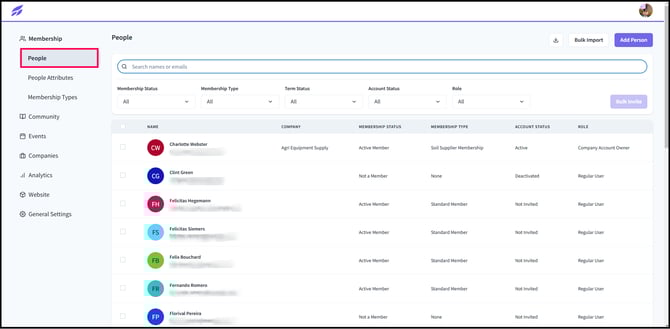
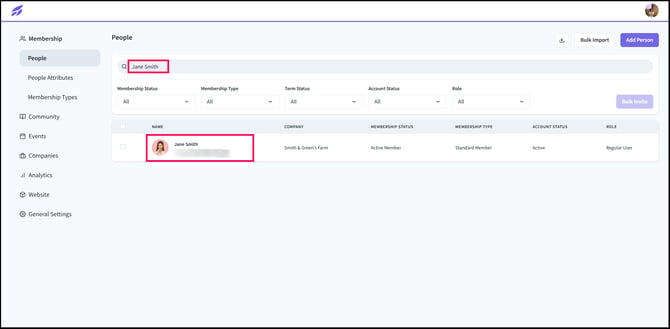
2) Search for the user you want to moderate in the search bar and click on their account.
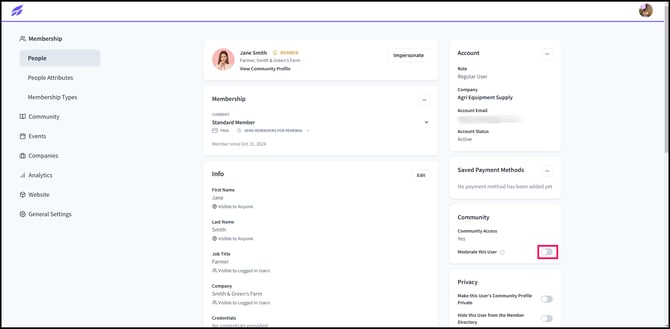
3) In the lower right corner of the screen, there is a toggle button next to "Moderate this User." Click this button to enable user moderation.
4) Whenever moderated users make a post, you will receive a notification about it.
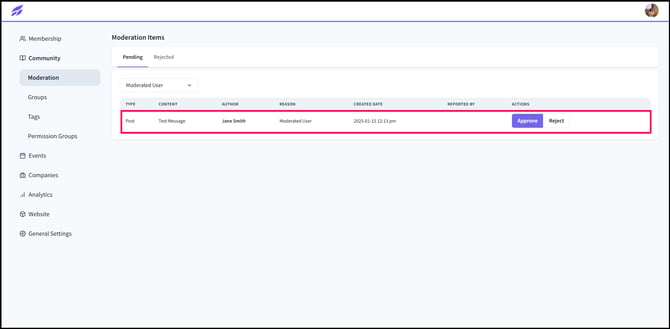
Moreover, you can view posts of moderated users in the admin site by clicking on the Community tab, and the Moderation tab just below it. Click on the drop-down button and choose Moderated User.

5) In this tab, you will be able to see all posts from moderated users and review whether their posts should be approved for the community.
Need Help?
If you have questions or need assistance, please reach out to support@tradewing.com.